In February 2026 I was debugging why ren.ph wasn't getting indexed by AI tools. The site had 65,000+ pages of verified Philippine real estate data. Google ranked some of it. But when I asked ChatGPT, Claude, or Gemini about ren.ph, all three said they couldn't find the site or didn't know what it was.
The site was working. The crawlers couldn't read it.
The culprit was Cloudflare. Specifically, Cloudflare's AI bot blocking feature, which was injecting a managed block at the top of my robots.txt file, before my own custom rules. The block told ClaudeBot, GPTBot, Google-Extended, and PerplexityBot to disallow everything. My intended Allow rules sat underneath, doing nothing.
I turned the toggle off. The block was still there.
I purged the cache. The block was still there.
I checked three different dashboard locations. The block was still there.
Eventually I had to deploy a Cloudflare Worker to intercept robots.txt requests entirely and serve my own version, bypassing Cloudflare's injection at the edge. That worked. ren.ph started showing up in AI tools within days.
This post is what I learned. If your business is invisible to ChatGPT, Claude, Perplexity, or Gemini despite ranking on Google, your CDN is probably the reason. Most Philippine businesses on Cloudflare don't know this toggle exists. Most SEO agencies don't check for it. Most developers leave the security features on by default. The result is thousands of websites quietly invisible to AI systems, despite being fully optimized for traditional search.
The fix is real. The path is documented. Let's work through it.
How to Confirm AI Crawlers Are Being Blocked
Before touching any settings, confirm the diagnosis. Five tests, ten minutes total.
The first test is to open your robots.txt directly in a browser. Visit yourdomain.com/robots.txt. Look for any section that says # BEGIN Cloudflare Managed content or # END Cloudflare Managed content. That's the injection. If you see it, your CDN is rewriting your file at request time.
The second test is to ask AI tools about your business directly. Open ChatGPT, Claude, and Perplexity in separate tabs. Ask each: “What does the business at [yourdomain.com] do?” If all three say they can't access the site, don't know it, or hallucinate a generic answer, you have a crawler block.
The third test is the site: search. Type site:yourdomain.com into Google. If a live site returns zero or very few results, your indexing is broken at the crawler level. This catches more than Cloudflare issues, but Cloudflare is the most common cause in 2026.
The fourth test, if you're on Cloudflare, is AI Crawl Control itself. Open the Cloudflare dashboard, select your domain, then open AI Crawl Control. The Overview and Metrics tabs show which AI crawlers hit your site, how often, and which ones your rules are blocking. If you see GPTBot, ClaudeBot, PerplexityBot, or Google-Extended getting denied, Cloudflare is showing you the problem directly.
The fifth test, if you have server log access, is to grep for the AI user agents in your access logs. Look for “GPTBot”, “ClaudeBot”, “PerplexityBot”, “anthropic-ai”, “Google-Extended”, “ChatGPT-User”. If you see them hitting 403 responses, or hitting robots.txt and then never returning, your block is working as designed and against you.
Once you've confirmed AI crawlers are being blocked, the fix moves through three layers. Sometimes one layer is enough. Sometimes all three are needed.
Layer 1: The Cloudflare Dashboard Controls
This is where most people start, and where most people wrongly believe they've finished.
Cloudflare keeps moving these settings. When I hit this on ren.ph in February 2026, the controls lived deeper in the dashboard, buried under the Bots section. They've since pulled the two that matter right onto your domain's Overview page. If your dashboard looks like the screenshot below, start here. It's the fastest path now.
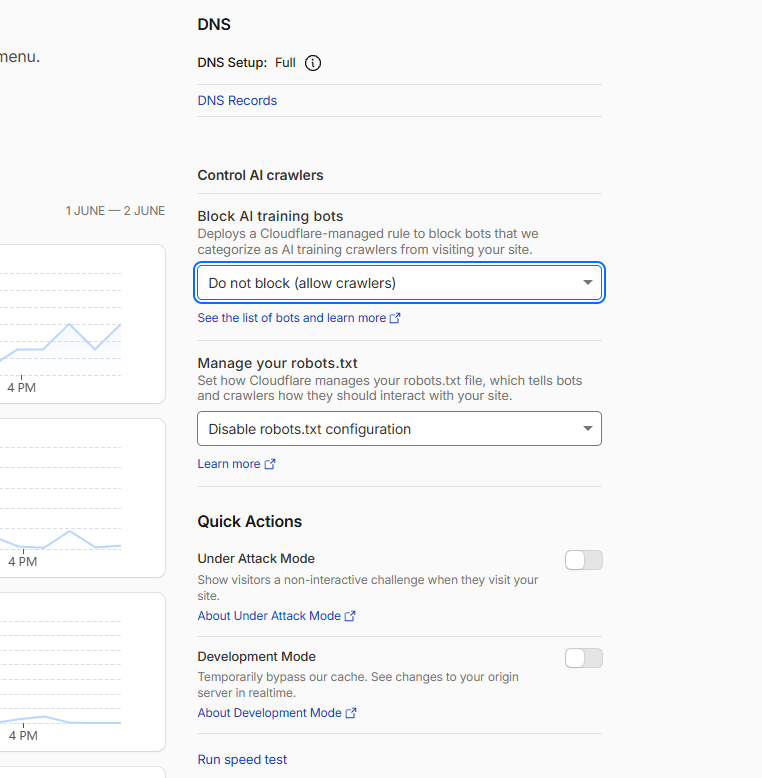
Open the Cloudflare dashboard, select your domain, and look at the Overview page. Scroll to the “Control AI crawlers” panel. Two dropdowns sit there, and both caused my February problem.
The first is “Block AI training bots.” Set it to “Do not block (allow crawlers).” The other options block AI bots everywhere or only on pages with ads. If you're building for AI search visibility, you want them allowed.
The second is “Manage your robots.txt.” Set it to “Disable robots.txt configuration.” This is the one almost everyone misses. That dropdown decides whether Cloudflare writes and injects its own managed robots.txt into your file. That injection was the exact thing disallowing ClaudeBot and GPTBot at the top of ren.ph's robots.txt, sitting above my own Allow rules and overriding them. Switch it to disable and Cloudflare stops rewriting your file.
For a lot of people today, that second dropdown is the whole fix. The managed injection that I had to fight with a Worker in February is now a setting you can turn off in one click. If it works, you may never need Layers 2 and 3.
After setting both, re-check your robots.txt in an incognito browser. If the # BEGIN Cloudflare Managed content block is gone, Layer 1 did its job. Move to Layer 2 for the robots.txt audit.
If your dashboard doesn't show that panel
Cloudflare rolls these UI changes out in waves, and the exact path depends on your dashboard version and plan tier. If you don't see the “Control AI crawlers” panel on Overview, the same controls live one level deeper.
Look for an “AI Crawl Control” section in the left sidebar. The Crawlers tab lets you allow or block individual crawlers. The robots.txt management lives in the same area.
On older dashboards, the bot-blocking control is under Security, then Bots, labeled “AI Scrapers and Crawlers.” Turn it off there.
On Pro and Business plans, there's a separate “Bot Fight Mode” (or “Super Bot Fight Mode”) toggle under Security, then Bots. It sometimes challenges AI crawlers as a side effect. Turn it off if your strategy is AI visibility. The tradeoff is more general bot traffic, which is the right tradeoff for most businesses prioritizing AI search.
If you've set every relevant control to allow and the managed block is still showing up in your robots.txt, you're in the situation I was in. Cloudflare is injecting the block on every request regardless of the surface setting, for traffic from certain AI provider IPs. That's where Layer 3 becomes necessary.
Layer 2: Auditing Your robots.txt
Even with the Cloudflare block disabled, your own robots.txt might still be working against you.
A healthy AI-friendly robots.txt explicitly allows the AI crawlers you want indexing your site. Implicit allows aren't always enough, because some crawlers default to checking for a specific Allow rule.
Here's the robots.txt I run on godmode.ph after the February debugging session. Adapt it to your domain.
# Bot Access Policy
# Allow legitimate search engines and AI assistants
# Block scrapers, harvesters, and malicious bots

# Search engines
User-agent: Googlebot
Allow: /

User-agent: Googlebot-Image
Allow: /

User-agent: Bingbot
Allow: /

User-agent: DuckDuckBot
Allow: /

User-agent: Applebot
Allow: /

# Social previews
User-agent: facebookexternalhit
Allow: /

User-agent: LinkedInBot
Allow: /

User-agent: Twitterbot
Allow: /

# AI assistants
User-agent: GPTBot
Allow: /

User-agent: ChatGPT-User
Allow: /

User-agent: ClaudeBot
Allow: /

User-agent: Claude-Web
Allow: /

User-agent: anthropic-ai
Allow: /

User-agent: PerplexityBot
Allow: /

User-agent: Cohere-ai
Allow: /

User-agent: Google-Extended
Allow: /

# SEO scrapers - block to protect bandwidth
User-agent: AhrefsBot
Disallow: /

User-agent: SemrushBot
Disallow: /

User-agent: DotBot
Disallow: /

User-agent: MJ12bot
Disallow: /

User-agent: DataForSeoBot
Disallow: /

# Default - allow everything else
User-agent: *
Allow: /

Sitemap: https://yourdomain.com/sitemap.xml
Three things to notice about this file.
The AI crawlers are listed individually with explicit Allow rules, not relying on the catch-all at the bottom. Some crawlers parse robots.txt strictly and need their exact user agent string present.
The SEO scrapers are blocked. AhrefsBot, SemrushBot, DataForSeoBot, and similar tools consume bandwidth without giving you anything back. Block them. Your competitors who use these tools to spy on you can still see your public pages directly, but you stop subsidizing their research.
The default rule at the bottom is Allow: /, not Disallow: /. This is the single most common mistake I see. A blanket disallow at the bottom kills every crawler you didn't explicitly whitelist above. Switch it to Allow.
Save your new robots.txt, deploy, and test in incognito. If the Cloudflare managed block is gone and your new file is being served, Layer 2 is complete.
Layer 3: The Cloudflare Worker Override
This is the nuclear option for when the dashboard toggles don't fully disable AI bot blocking. When I went through this in February, even with every relevant toggle off and the dashboard reporting all crawlers as “Allow”, Cloudflare was still injecting the managed block at the edge for requests from certain AI provider IPs.
The fix is to deploy a Cloudflare Worker that intercepts requests to /robots.txt and returns your file directly, bypassing Cloudflare's injection entirely.
Here's the Worker code.
export default {
  async fetch(request) {
    const url = new URL(request.url);

    if (url.pathname === '/robots.txt') {
      const robotsTxt = `# Bot Access Policy
# Allow legitimate search engines and AI assistants

User-agent: Googlebot
Allow: /

User-agent: Bingbot
Allow: /

User-agent: GPTBot
Allow: /

User-agent: ClaudeBot
Allow: /

User-agent: anthropic-ai
Allow: /

User-agent: PerplexityBot
Allow: /

User-agent: Google-Extended
Allow: /

User-agent: *
Allow: /

Sitemap: https://yourdomain.com/sitemap.xml
`;

      return new Response(robotsTxt, {
        headers: {
          'Content-Type': 'text/plain',
          'Cache-Control': 'public, max-age=3600',
        },
      });
    }

    return fetch(request);
  },
};
Deploy this Worker and route it to yourdomain.com/robots.txt only. The route pattern in Cloudflare Workers settings should be yourdomain.com/robots.txt.
Once deployed, requests to /robots.txt are handled by your Worker before Cloudflare's managed content injection can run. The Worker returns your file exactly as you want it served. Every other request passes through normally.
There's one edge case I ran into. When I asked Claude (via Anthropic's own web fetch infrastructure) to check ren.ph/robots.txt after the Worker was deployed, it still saw the old Cloudflare-injected version. Real browsers, curl with AI user agents, and incognito Claude sessions all saw the clean version. Anthropic's internal proxy infrastructure appears to cache differently than user-facing crawlers. This is not a problem for your actual SEO and AI visibility outcomes. The crawlers that matter, GPTBot in production, ClaudeBot in production, PerplexityBot in production, all see the clean file. Don't get distracted by what Claude in a chat window sees.
Custom WAF Rules for Selective Crawler Control
If you want more granular control than robots.txt provides, custom Web Application Firewall rules let you allow or block specific crawlers at the request level. This sits between the dashboard toggle and the Worker override.
A simple rule structure looks like this. If the request's user agent contains “GPTBot”, “ClaudeBot”, “PerplexityBot”, “Google-Extended”, “anthropic-ai”, “Googlebot”, or “Bingbot”, allow it. If the request matches known bad bot patterns (no user agent, suspicious headers, high request rate from a single IP), challenge or block it. Everything else gets a managed challenge, which is Cloudflare's JavaScript and CAPTCHA filter for unverified traffic.
Custom WAF rules are creatable through the Cloudflare REST API. Wrangler, Cloudflare's CLI, doesn't handle WAF rules directly, so you'll need curl or another HTTP client with your API token and zone ID.
A basic curl example for allowing GPTBot specifically:
curl -X POST \
  "https://api.cloudflare.com/client/v4/zones/{zone_id}/firewall/rules" \
  -H "Authorization: Bearer {api_token}" \
  -H "Content-Type: application/json" \
  -d '{
    "action": "allow",
    "filter": {
      "expression": "(http.user_agent contains \"GPTBot\")"
    },
    "description": "Allow GPTBot for AI search visibility"
  }'
For most businesses, custom WAF rules are unnecessary. The dashboard toggle plus a clean robots.txt covers 95% of cases. WAF rules are useful when you want different policies for different crawlers, or when you want rate limiting on specific user agents without blocking them entirely.
Rate Limiting Without Blocking
Once AI crawlers are allowed in, you might want to cap how aggressively they can hammer your server. A rate limit of 60 requests per minute per IP is generous enough for legitimate crawling but stops abusive scraping.
Cloudflare's rate limiting lives under Security, then Rate Limiting Rules. Create a rule targeting all traffic with a threshold of 60 requests per minute per IP, action set to “managed challenge.” Legitimate crawlers handle the challenge fine. Aggressive scrapers fail it.
This protects your server costs without blocking the AI visibility you're trying to build.
What Happens After You Fix It
Cloudflare changes take effect immediately. The robots.txt served from your domain reflects your new policy within seconds. Cache purges are usually unnecessary for robots.txt specifically, though purging the Cloudflare cache once after the fix doesn't hurt.
AI systems re-crawl on their own schedules. Google indexes the new robots.txt within 1 to 14 days, depending on your domain's crawl frequency. ChatGPT and Claude refresh their retrieval-side caches in days to weeks. Perplexity tends to be the fastest of the three because its crawler runs more aggressively. Gemini lags slightly behind.
Training data updates are a different problem. The current generation of AI models was trained months or years ago. Those models won't suddenly know about your business just because you unblocked the crawler. What changes is the live retrieval layer: when a user asks ChatGPT or Claude or Perplexity a question that triggers web search, your site can now be retrieved as a source.
Set the expectation correctly. Visibility in live AI search recovers fast. Presence in training data takes a generation cycle. Both matter, but the fast win is the live retrieval layer.
Other CDNs and Hosts With Similar Issues
Cloudflare is the most common culprit in 2026 because of how aggressively they've pushed AI bot blocking as a default feature. The same pattern exists on other CDNs.
AWS CloudFront has bot management rules through AWS WAF that can block AI crawlers. Check the AWS WAF console under Web ACLs for any rules targeting AI user agents.
Fastly handles this through their VCL configuration or the Compute platform. Look for VCL snippets blocking specific user agents or any bot management modules in your service configuration.
Akamai Bot Manager has explicit AI crawler categories that can be set to allow, monitor, or deny. The default depends on your Akamai contract.
Vercel itself doesn't block AI crawlers, but if you have a custom edge middleware in middleware.ts that does user agent filtering, check it.
Plain hosting through Hostinger, GoDaddy, SiteGround, and similar shared hosts usually doesn't have this problem at the host level. The robots.txt you upload is the robots.txt that gets served. If you're seeing AI crawler blocks on shared hosting, check whether a WordPress security plugin (Wordfence, Sucuri, iThemes Security) is doing the blocking instead.
Frequently Asked Questions
Does disabling AI bot blocking hurt my SEO?
No. Traditional SEO and AI bot access are separate concerns. Allowing GPTBot, ClaudeBot, and PerplexityBot to crawl your site doesn't affect your Googlebot or Bingbot rankings. It only enables AI search visibility, which is additive to your existing SEO.
Will my Cloudflare protection still work for bad bots?
Yes. Cloudflare's bot management distinguishes between AI crawlers and abusive bots. Disabling the AI bot blocking feature specifically does not turn off DDoS protection, the Web Application Firewall, or hotlink protection. Those remain active. You're only opening the door to AI search crawlers, not to attack traffic.
What if I want some AI bots but not others?
Use Layer 2 (robots.txt) or Layer 4 (custom WAF rules). In robots.txt, set explicit Allow for the crawlers you want and Disallow for the ones you don't. For server-level enforcement that can't be bypassed by misbehaving bots, use custom WAF rules to allow or block by user agent.
How fast will AI search start citing my site after I fix this?
Live retrieval typically recovers within 7 to 21 days. Training data presence is a longer horizon, often a full model generation cycle. The first sign of progress is usually Perplexity, which crawls aggressively, followed by ChatGPT with web search, then Claude, then Google AI Overviews.
Will Cloudflare re-enable this toggle automatically?
It has historically. Cloudflare pushes platform updates that can reset bot management defaults, especially after dashboard UI changes. The Worker override in Layer 3 is the most resilient fix because your Worker code runs regardless of dashboard toggles. If you want the simpler dashboard fix to stick, monitor your robots.txt monthly to catch any silent re-enables. This already happened once. The control I describe in Layer 1 sat under Security, then Bots when I first fixed ren.ph in February 2026. By mid-2026 Cloudflare had moved it onto the domain Overview page. Expect the path to keep shifting. The Worker in Layer 3 is the only fix that ignores where the dashboard buttons are this month.
Does this apply to subdomains?
Each Cloudflare zone has its own bot management settings. If yourdomain.com is on one zone and blog.yourdomain.com is on another, you need to disable AI bot blocking on each zone independently. Subdomains on the same zone inherit the parent zone's settings.
What if I'm not on Cloudflare?
Check your CDN's bot management settings. AWS WAF, Akamai Bot Manager, Fastly's Compute or VCL configs, and Sucuri's WAF all have analogous controls. If you're on shared hosting without a CDN, check your security plugins. WordPress sites running Wordfence, Sucuri, or iThemes commonly have AI crawler blocks enabled by default.
How do I know which AI crawlers are most important to allow?
In rough order of impact for Philippine businesses in 2026: GPTBot and ChatGPT-User (ChatGPT), ClaudeBot and anthropic-ai (Claude), PerplexityBot (Perplexity), Google-Extended (Gemini and Google AI Overview training), Bytespider (TikTok/ByteDance). The first four cover most of the citation surface area for English-language queries.
Can I just block all bots and start over from scratch?
You could, but you'll need to add explicit Allow rules for every search and AI crawler you want indexing you. Most businesses prefer the inverse: allow everything by default, block the specific scrapers (Ahrefs, Semrush, DataForSEO) that consume bandwidth without value.
How do I measure whether the fix is working?
Use the same five confirmation tests from the start of this article on a recurring schedule. Ask AI tools about your business monthly. Check Cloudflare's bot analytics for the AI crawler user agents showing up in the allowed traffic. Watch your Google Search Console for changes in crawl frequency. The full measurement methodology is at godmode.ph/how-to-measure-ai-visibility-philippines.
If you've worked through all three layers and AI tools still can't see your site, the problem is likely not at the CDN. Run the 8-reason diagnostic for AI invisibility to identify which content, schema, or entity-level fix you're missing.
About the Author
Aaron Zara is the founder of Godmode Digital and the engineer behind ren.ph (65,291 verified Philippine real estate data nodes). He holds a PRC real estate broker license and has 18 years of building across digital marketing and business operations.